
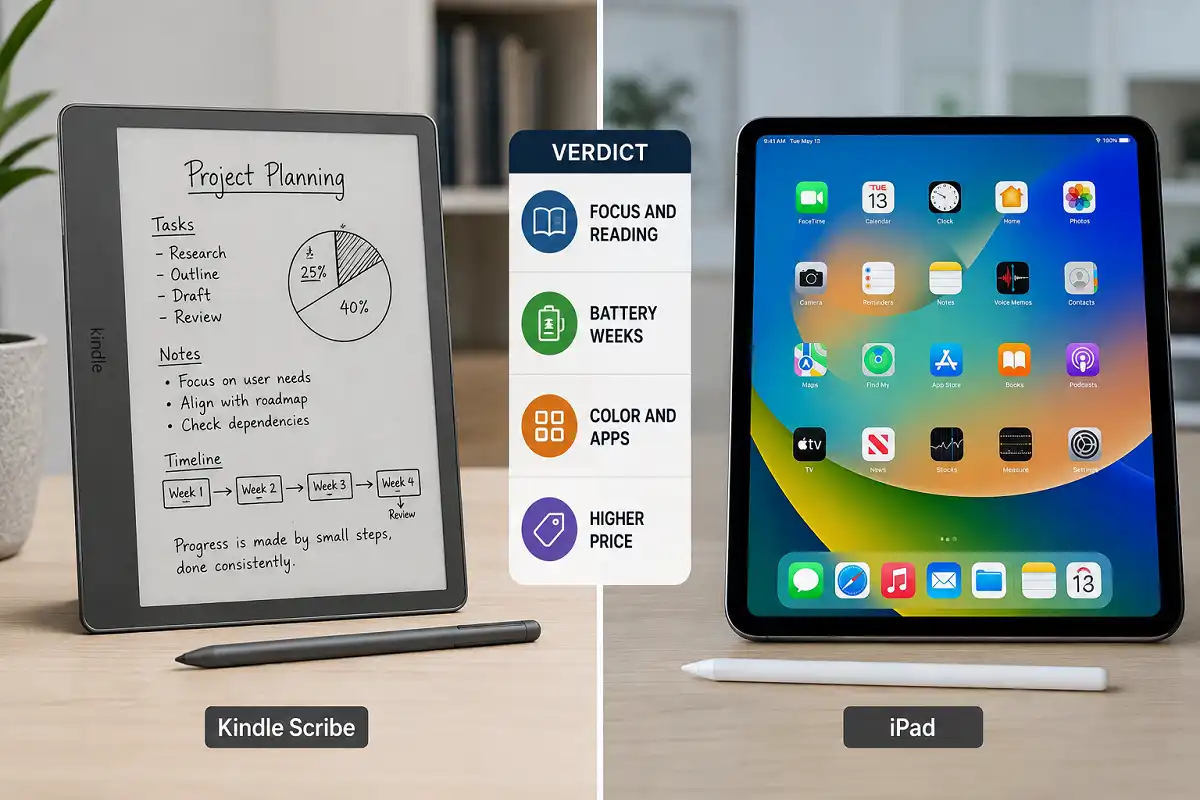
Choosing between a distraction-free writing slate and a full color tablet is tricky. The kindle scribe vs ipad debate comes down to how you actually work. This guide breaks down reading, writing, apps, battery, and price so you can pick the right device with confidence.
The Kindle Scribe suits readers and note-takers who want long battery life and an eye-friendly paper feel. The iPad fits people who need color, apps, drawing, and multitasking. Pick the Scribe for focus, the iPad for versatility.
Kindle Scribe vs iPad: The Core Difference
The core difference is simple. The Kindle Scribe is an E Ink device built for reading and writing. The iPad is an LCD tablet built for everything.
That single distinction shapes the entire kindle scribe vs ipad comparison. One device removes distractions. The other adds features.
The Scribe uses a gray-scale electronic paper screen. It refreshes slowly and shows no color. Yet it stays gentle on the eyes for hours.
The iPad uses a bright Liquid Retina display. It handles video, games, art, and browsing. But that same screen invites constant notifications.
Your choice depends on your goal. Do you want to concentrate, or do you want to do many things at once?
Think of it this way. The Scribe is a quiet library. The iPad is a busy workshop. Both are useful, but they serve different moods and tasks.
The kindle scribe vs ipad choice is really a choice about attention. A Scribe protects it. An iPad spends it on many small tasks at once.
If you are still deciding on a broader note-taking slate, our guide on choosing an e-ink note tablet covers the wider category in detail.
Display and Reading Experience
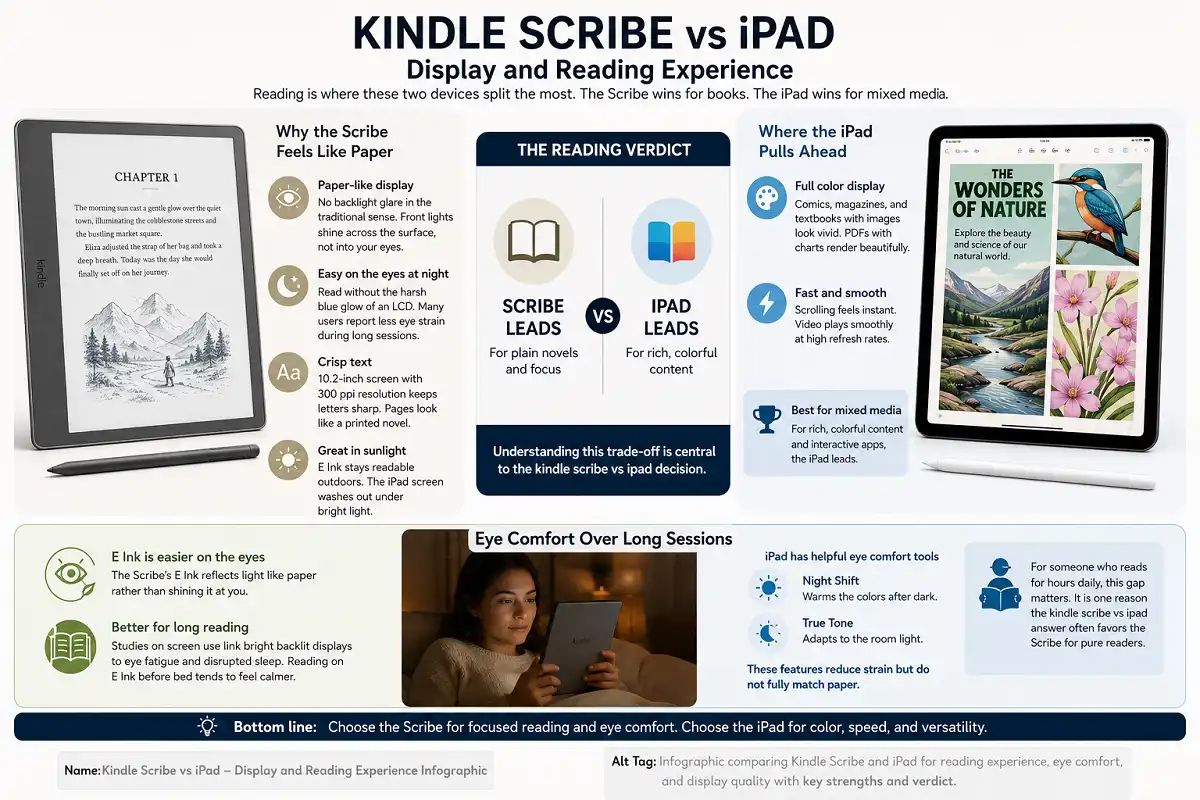
Reading is where these two devices split the most. The Scribe wins for books. The iPad wins for mixed media.
Why the Scribe Feels Like Paper
The Scribe screen mimics real paper. It has no backlight glare in the traditional sense. Instead, front lights shine across the surface, not into your eyes.
This matters at night. You read without the harsh blue glow of an LCD. Many users report less eye strain during long sessions.
The 10.2-inch screen holds crisp text. The 300 ppi resolution keeps letters sharp. Pages look like a printed novel.
Sunlight is another strength. E Ink stays readable outdoors. The iPad screen washes out under bright light.
Where the iPad Pulls Ahead
The iPad shows full color. Comics, magazines, and textbooks with images look vivid. PDFs with charts render beautifully.
The screen also moves fast. Scrolling feels instant. Video plays smoothly at high refresh rates.
So the reading verdict is split. For plain novels and focus, the Scribe leads. For rich, colorful content, the iPad leads. Understanding this trade-off is central to the kindle scribe vs ipad decision.
Eye Comfort Over Long Sessions
Eye comfort favors the Scribe for long reading. E Ink reflects light like paper rather than shining it at you.
Studies on screen use link bright backlit displays to eye fatigue and disrupted sleep. Reading on E Ink before bed tends to feel calmer.
The iPad offers tools to help. Night Shift warms the colors after dark. True Tone adapts to the room light. These features reduce strain but do not fully match paper.
For someone who reads for hours daily, this gap matters. It is one reason the kindle scribe vs ipad answer often favors the Scribe for pure readers.
Writing and Note-Taking
Both devices let you write by hand. The feel and the software differ sharply.
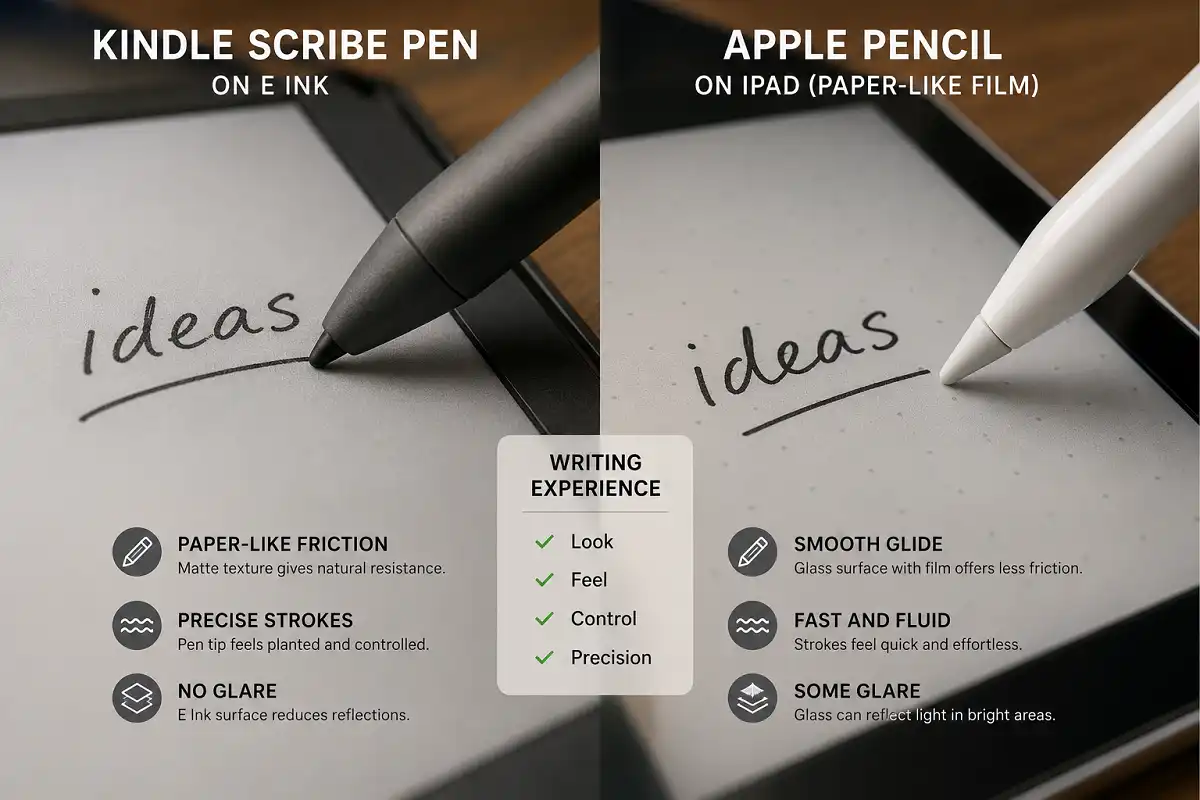
The Kindle Scribe pen glides across a textured screen. It mimics pen on paper closely. There is almost no lag between stroke and mark.
The pen needs no charging. It attaches magnetically. You can write in books, PDFs, and dedicated notebooks.
The iPad uses the Apple Pencil Pro. It is precise and pressure sensitive. It supports tilt shading and quick double-taps.
But the iPad’s glass surface feels slick. Writing can feel like a pen on a window. Many users add a matte screen protector to fix this.
Note Software Compared
Scribe notes stay simple. You get templates, folders, and basic organization. The focus is clean capture, not heavy editing.
Amazon has added handwriting features over time. You can convert notes to text and export them by email. Sticky notes let you mark up PDFs and books.
The iPad opens a huge world of apps. GoodNotes, Notability, and Notion all run well. You can search handwriting, add images, and record audio.
That flexibility helps power users. You can link notes, sync across devices, and build a full knowledge system. The Scribe cannot match that depth.
So the writing answer depends on depth. For pure, distraction-free writing, the Scribe shines. For advanced note systems, the iPad wins. This is a key layer of the kindle scribe vs ipad question.
Which Feels Better to Write On
Feel is personal, but patterns exist. Most people say the Scribe feels closer to real paper out of the box.
The Scribe’s textured screen adds friction. That slight drag makes handwriting feel natural. The tip does not slide away from you.
The iPad’s glass is smooth by default. A paper-like screen protector fixes most of this. Once added, the iPad writing feel improves a lot.
For handwriting purists, the Scribe often wins this round of the kindle scribe vs ipad match. For those who want options, the iPad adapts.
If handwriting quality is your top priority, you may also enjoy our piece on how handwritten notes help learning.
Apps and Software Ecosystem
Here the gap is enormous. The iPad runs a full operating system. The Scribe runs a locked reading platform.
The iPad has access to over a million apps. You can edit video, join calls, and play games. It replaces a laptop for many tasks.
The Scribe does one thing. It reads and it writes. There is no app store and no web browser worth using.
This limitation is a feature, not a flaw. Fewer apps mean fewer distractions. You cannot fall into a social media hole on a Scribe.
The iPad also connects to the wider Apple ecosystem. It syncs with a Mac, iPhone, and iCloud. Files move between devices without effort.
The Scribe connects mainly to your Amazon library and cloud storage. That link is smaller but reliable. Your books and notes stay backed up.
So think about self-control. If you need a walled garden, the Scribe helps. If you need power, the iPad delivers. Weighing this shapes the kindle scribe vs ipad outcome for many buyers.
Battery Life and Charging
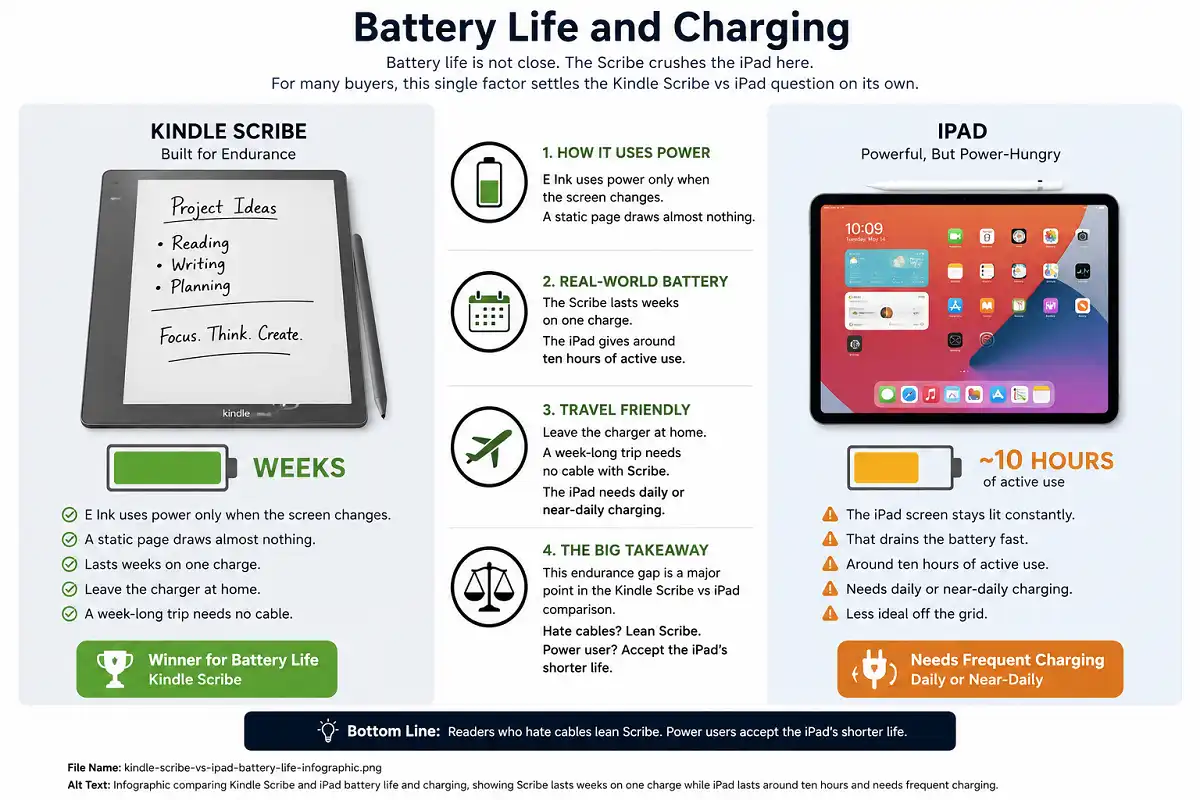
Battery life is not close. The Scribe crushes the iPad here. For many buyers, this single factor settles the kindle scribe vs ipad question on its own.
E Ink uses power only when the screen changes. A static page draws almost nothing. The Scribe lasts weeks on one charge.
The iPad screen stays lit constantly. That drains the battery fast. You get around ten hours of active use.
For travel, the Scribe is freeing. You can leave the charger at home. A week-long trip needs no cable.
The iPad needs daily or near-daily charging. That is fine at a desk. It is less ideal off the grid.
This endurance gap is a major point in the kindle scribe vs ipad comparison. Readers who hate cables lean Scribe. Power users accept the iPad’s shorter life.
Portability and Build
Both devices are thin and light. The Scribe is slightly lighter and simpler.
The Scribe weighs about 433 grams. It slips into a bag easily. The flat design feels sturdy.
The iPad varies by model. The base iPad and iPad Air stay light. The larger iPad Pro adds heft.
Neither device is hard to carry. The difference is small here. Both work well as daily companions.
Durability is comparable too. Both use metal and glass builds. Neither is fully waterproof, so both need care near liquids.
Storage differs in practice. The Scribe holds thousands of books in little space, since text files are tiny. The iPad needs more storage for apps, photos, and video, so pick the right capacity up front.
Kindle Scribe vs iPad: Price and Value
Price often decides the winner. The two devices sit in different ranges.
The Kindle Scribe is the more affordable pick. It bundles the pen at no extra cost. There are no ongoing fees for basic use.
The iPad costs more overall. The tablet itself is only the start. The Apple Pencil and a case add real money.
So value depends on need. If you only read and write, the Scribe saves cash. If you want a computer replacement, the iPad justifies the spend.
Here is a simple way to see the kindle scribe vs ipad value gap:
- Kindle Scribe: Lower price, pen included, single purpose.
- iPad: Higher price, accessories cost extra, unlimited uses.
For a wider look at how paper tablets fit study and work budgets, see our take on whether a paper tablet suits students.
Who Should Buy the Kindle Scribe
The Scribe fits a clear type of person. Buy it if you match these traits.
You read a lot of books. You want long battery life. You crave a distraction-free tool.
Students who take handwritten notes love it. Writers who draft by hand enjoy it. Anyone tired of screen glare benefits.
Frequent travelers also gain a lot. The weeks-long battery means one less cable to pack. Readers who finish many books each month save money on print.
The Scribe is not for you if you need color. It is wrong if you want apps. It fails as a laptop replacement.
Who Should Buy the iPad
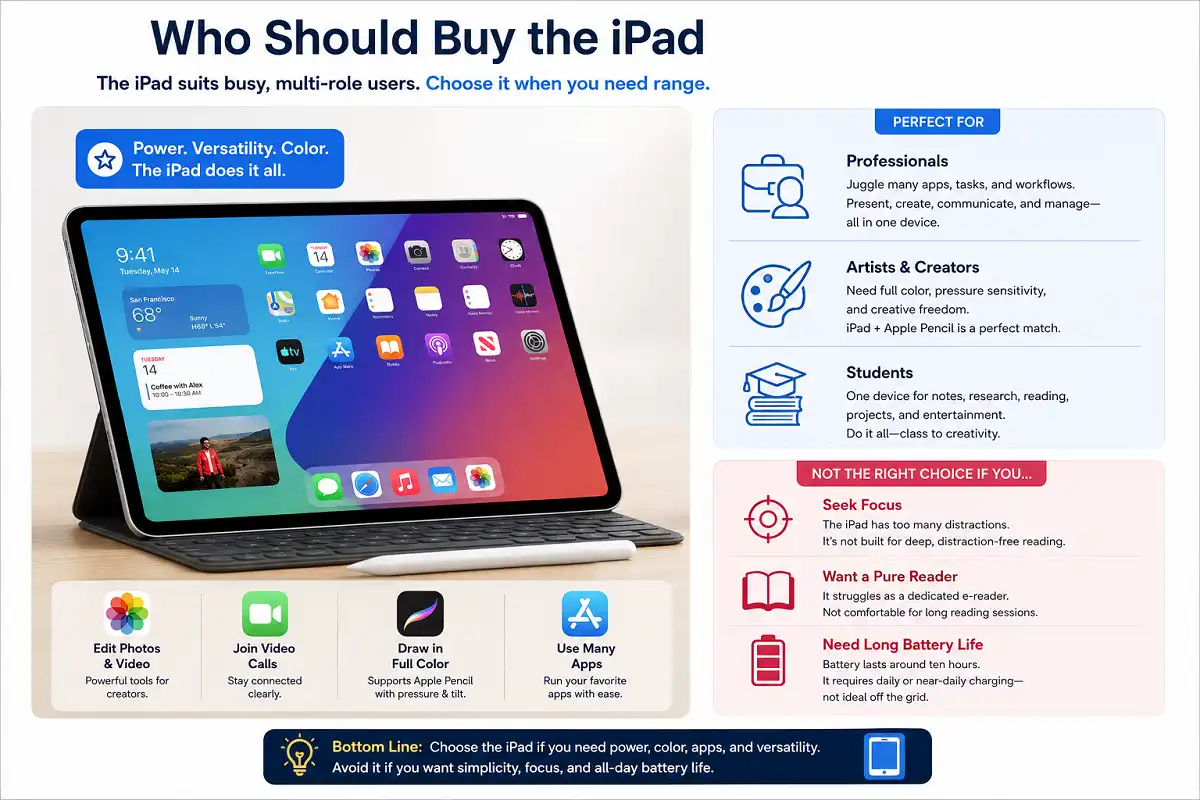
The iPad suits busy, multi-role users. Choose it when you need range.
You edit photos or video. You join video calls. You draw in full color.
Professionals who juggle many apps thrive on it. Artists who need pressure and color pick it. Students who want one device for everything favor it.
The iPad is wrong if you seek focus. It struggles as a pure reader. Its battery frustrates off-grid users.
Real-World Use Cases
Seeing each device in daily life helps. Here is how the kindle scribe vs ipad choice plays out for common users.
A student in lectures wants long battery and easy note capture. The Scribe records handwritten notes without pinging alerts. The iPad does more but tempts you toward other apps.
A traveling professional needs email, calls, and documents. The iPad handles all of it on the move. The Scribe cannot join a video meeting.
A novelist drafting by hand wants calm and focus. The Scribe gives a blank page and no noise. The iPad works too, but the distractions are one tap away.
A digital artist needs color and pressure. Only the iPad fits. The Scribe cannot paint or shade in color.
These snapshots show the pattern. The kindle scribe vs ipad winner shifts with the person, not the specs alone.
Common Mistakes When Choosing
People often pick the wrong device. A few errors show up again and again.
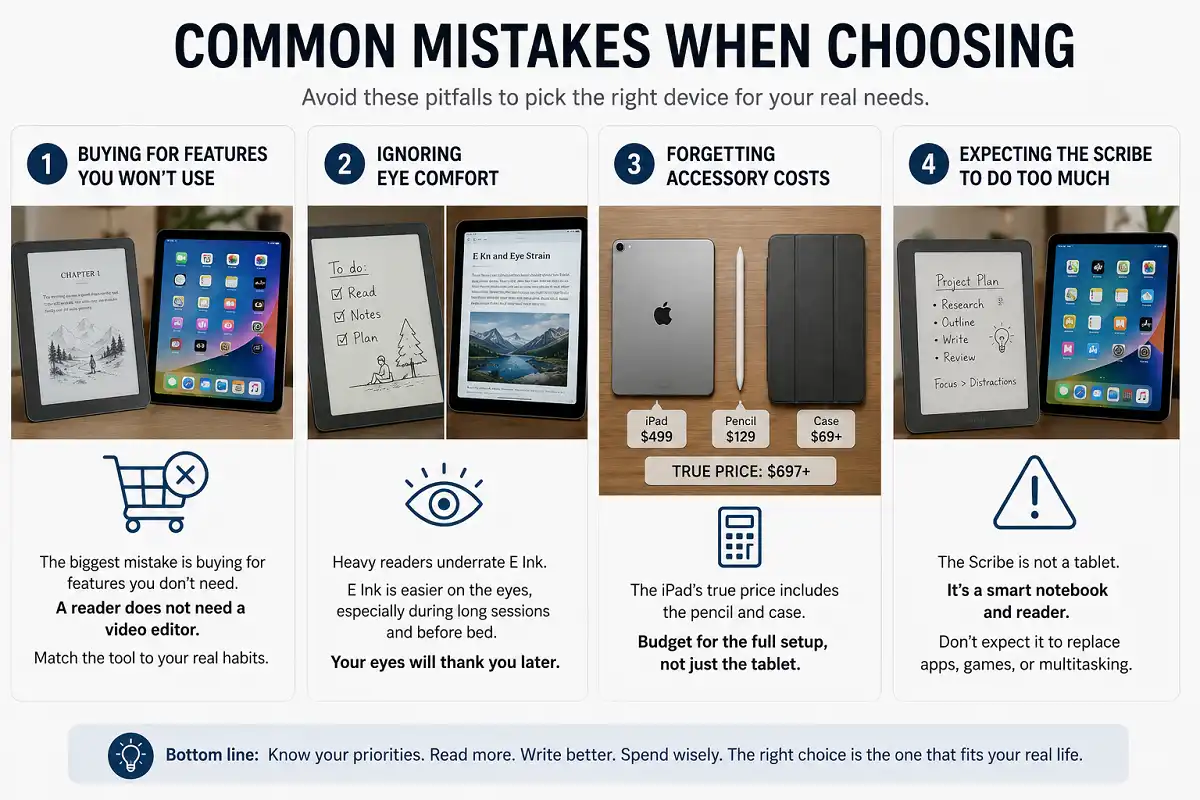
The first mistake is buying for features you will not use. A reader does not need a video editor. Match the tool to your real habits.
The second mistake is ignoring eye comfort. Heavy readers underrate E Ink. Their eyes pay the price later.
The third mistake is forgetting accessory costs. The iPad’s true price includes the pencil and case. Budget for the full setup.
The fourth mistake is expecting the Scribe to do too much. It is not a tablet. It is a smart notebook and reader.
Kindle Scribe vs iPad: Key Differences at a Glance
Here is a quick recap of how the two stack up. This summary captures the heart of the kindle scribe vs ipad debate.
- Screen: Scribe uses eye-friendly E Ink; iPad uses bright color LCD.
- Purpose: Scribe reads and writes; iPad does nearly everything.
- Battery: Scribe lasts weeks; iPad lasts hours.
- Apps: Scribe is locked down; iPad is fully open.
- Price: Scribe is cheaper; iPad costs more with extras.
- Best for: Scribe for focus; iPad for versatility.
If you want to explore rival writing slates too, our comparison of the reMarkable 2 against the Kindle Scribe adds useful context.
FAQs

Can the Kindle Scribe replace an iPad?
Is the iPad good for reading books?
Which is better for students?
Does the Scribe support PDFs?
Which lasts longer per charge?
Making the Right Choice
Your decision rests on one honest question. What do you truly need this device to do?
If you want to read and write without distraction, choose the Kindle Scribe. It offers paper-like comfort, huge battery life, and a fair price. It keeps you focused.
If you want a versatile machine for many tasks, choose the iPad. It brings color, apps, and power in one slim body. It handles almost anything.
In the end, the kindle scribe vs ipad match has no universal answer. Match the device to your habits, and you will not regret the purchase.
There is no single winner in the kindle scribe vs ipad race. There is only the right winner for you. Be honest about your habits, and the choice becomes clear.
For deeper technical background on the underlying screen technology, the E Ink article on Wikipedia is a helpful, authoritative resource.