
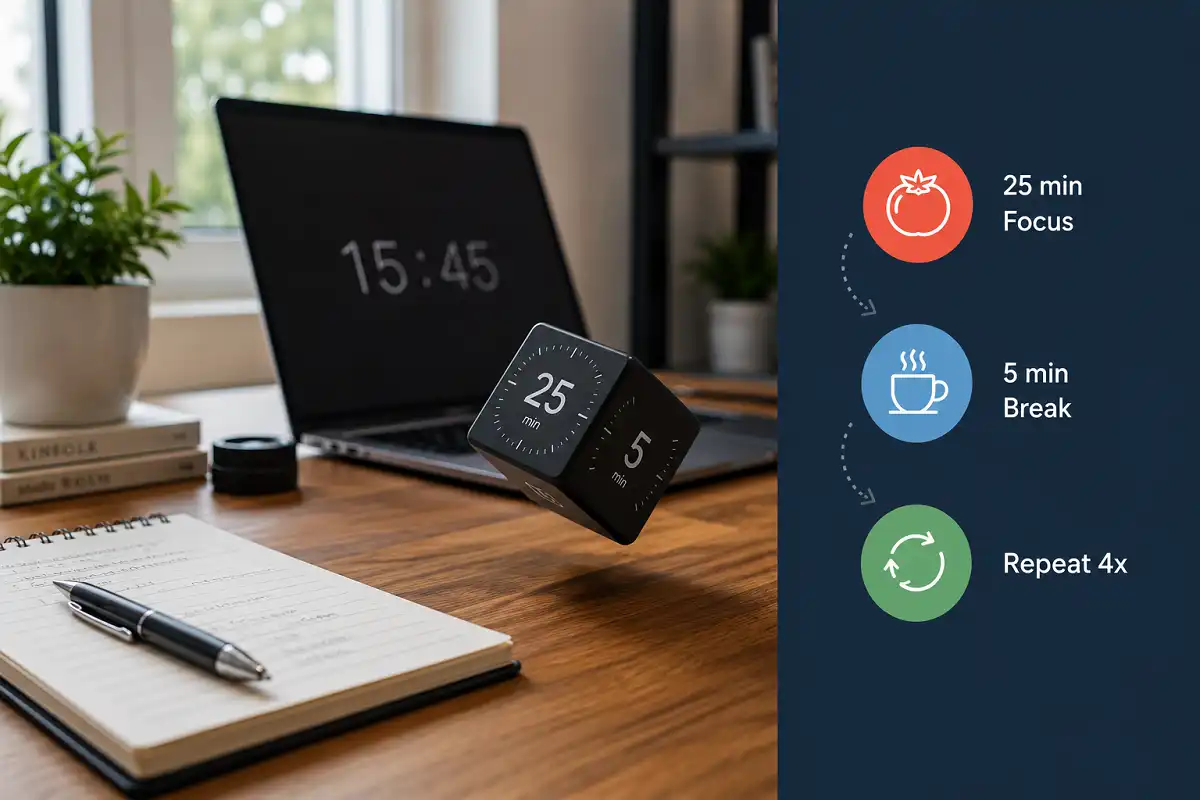
Pomodoro technique gadgets are physical timers, cubes, or smart devices built to run 25 minute focus sprints with short breaks. The best ones remove your phone from the equation, track streaks automatically, and give you a physical cue to start and stop working.
Struggling to stay focused with a phone timer that keeps pulling you into notifications? Pomodoro technique gadgets solve that exact problem. They give you a dedicated, distraction free way to run focus sprints without touching a screen.
What Are Pomodoro Technique Gadgets?
Pomodoro technique gadgets are dedicated devices built around the Pomodoro Technique, a time management method that breaks work into 25 minute sprints followed by 5 minute breaks. Instead of relying on a phone or laptop timer, these devices give you a physical or standalone way to track sprints.
These devices range from simple mechanical cubes you flip by hand to smart gadgets that sync with apps and log your focus history. Some sit on a desk. Others clip to a bag or sit next to a keyboard. What connects them all is one goal: helping you protect blocks of time from interruption.
The best pomodoro technique gadgets share three things. They start a session with one action, not several taps. They show remaining time at a glance. And they do not open a browser, an app store, or a notification tray while you work.
How Pomodoro Technique Gadgets Work
Pomodoro technique gadgets work by automating the two hardest parts of the technique: starting on time and stopping on time. Most people abandon the Pomodoro method not because the idea fails, but because manual timers are easy to ignore or delay.
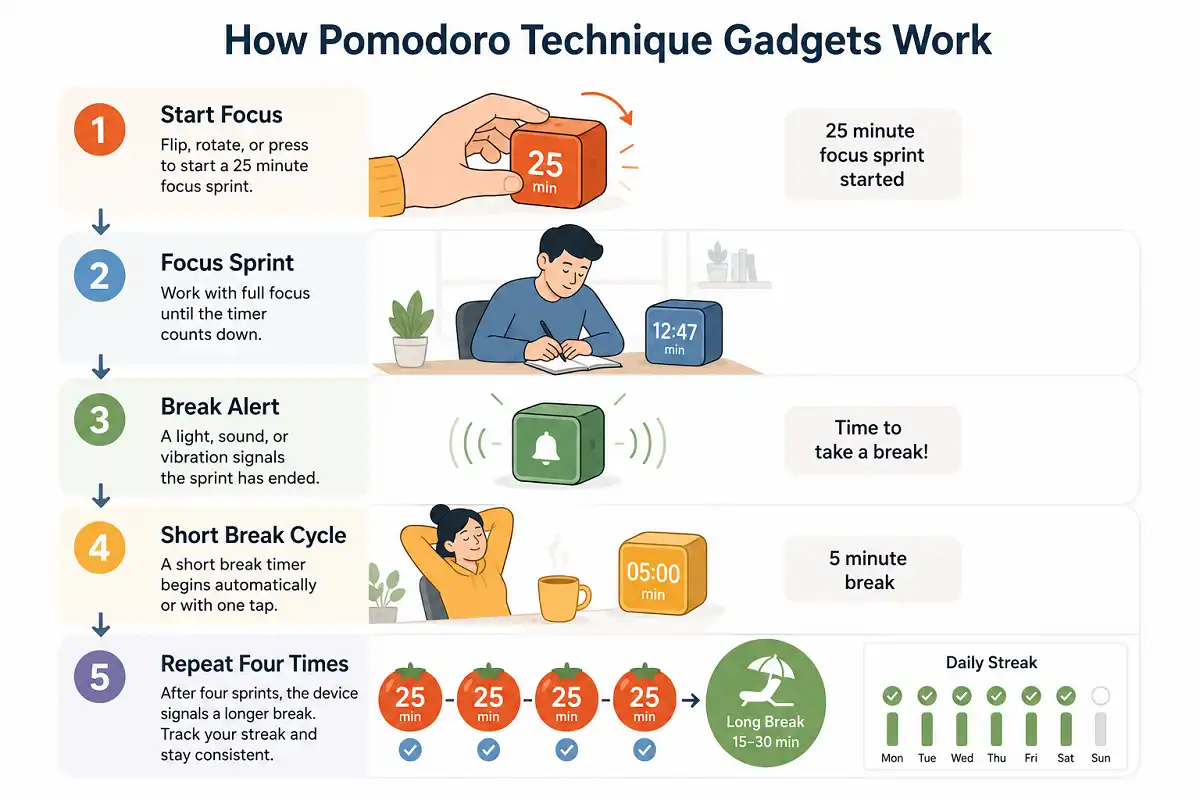
A typical device follows this pattern:
- Flip, rotate, or press to start a 25 minute sprint
- A light, sound, or vibration signals the sprint has ended
- A short break timer begins automatically or with one tap
- After four sprints, the device signals a longer break
Some higher end models add streak tracking, so you can see how many sprints you completed in a day or week. This turns a simple timer into a lightweight accountability tool.
Types of Pomodoro Technique Gadgets
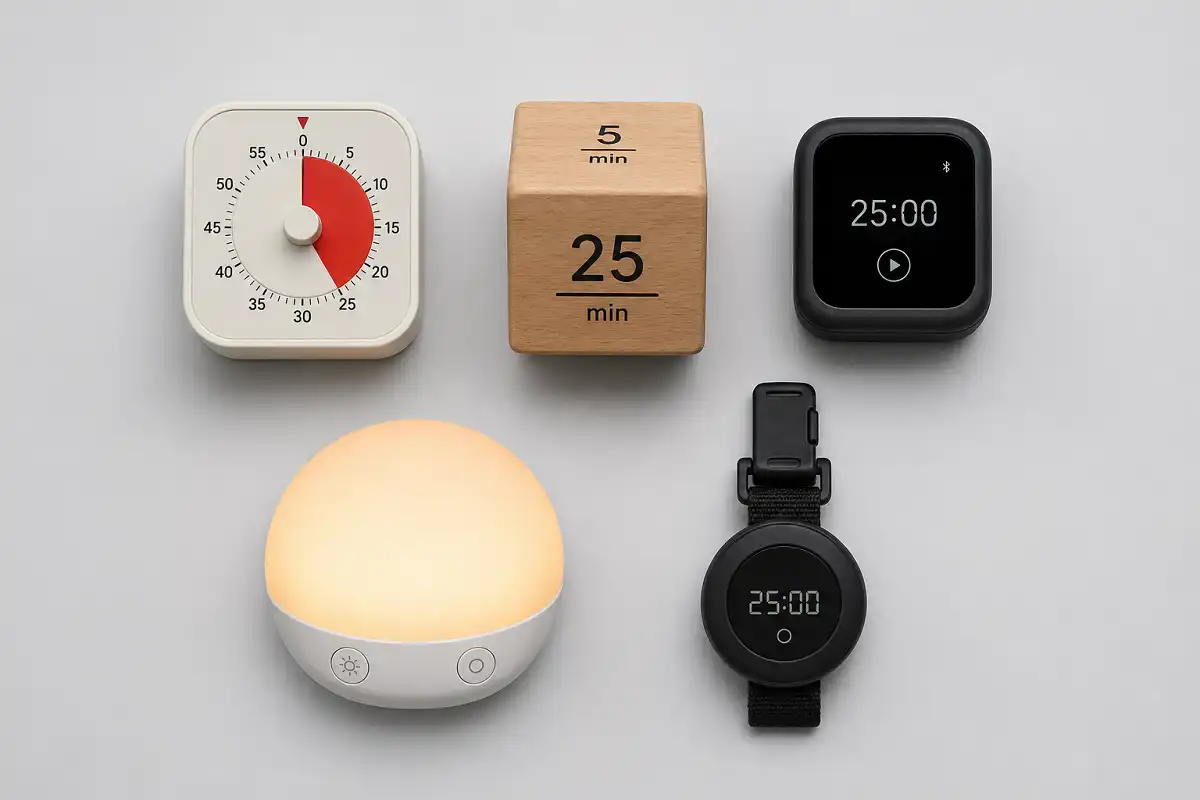
Below is a practical breakdown of the main categories you will find, along with who each one suits best.
Mechanical Timers
Mechanical pomodoro technique gadgets are the original and still the most reliable option. You twist a dial, and it counts down with a visible needle or ring. There is no screen, no charging, and no software to update.
These work best for people who get distracted by anything digital, including a smart timer’s app.
Smart Timer Cubes
Timer cubes let you flip a physical cube to switch between preset durations, usually 25, 15, 5, and 50 minutes. Flipping the cube starts the timer instantly. This category has become one of the most popular focus timer styles because it needs zero setup.
App Connected Focus Devices
Some smart models pair with a phone or desktop app over Bluetooth. They log every completed sprint, show weekly focus trends, and sometimes block distracting apps automatically once a session starts.
Choose this type only if you trust yourself not to get pulled into the paired app itself.
Desk Focus Lights
A focus light glows one color during a work sprint and switches color during breaks. It also signals to people nearby that you are in a focus block, which helps in shared offices or homes.
Wearable Timers
Small clip on or wrist worn timers work well for people who move between rooms or do not sit at a fixed desk, such as artists, technicians, or people studying with physical books.
Best Features to Look for in Pomodoro Technique Gadgets
When choosing pomodoro technique gadgets, prioritize function over extra features. A cluttered device defeats the purpose of a focus tool.
Look for:
- One action start. A single flip, twist, or press, not a multi-step menu.
- Clear time display. You should know remaining time without squinting or scrolling.
- Silent mode. A vibration or light option matters in shared spaces.
- Battery life or no battery at all. Mechanical timers avoid this problem entirely.
- Durable build. Desk gadgets get knocked around daily, so plastic quality matters.
Avoid devices with app requirements just to set a basic timer. That adds friction the Pomodoro Technique is designed to remove.
Pomodoro Technique Gadgets vs a Phone Timer
Many people ask why they should buy a device when a phone already has a timer. In practice, pomodoro technique gadgets outperform phone timers because a phone is also the source of most interruptions. Every notification, badge, or lock screen glance breaks focus, even if the timer itself keeps running.
| Factor | Phone Timer | Dedicated Focus Devices |
|---|---|---|
| Interruption risk | High, notifications visible | Low to none |
| Setup speed | Requires opening phone and app switching | One action |
| Visual focus cue | None | Physical presence signals focus mode |
| Battery dependency | Yes | Often none (mechanical models) |
| Cost | Free | Usually $10 to $60 |
A phone timer works fine for occasional use. A dedicated device works better for daily, disciplined focus routines, especially if you are also structuring your day around short work sprints.
Common Mistakes When Using Pomodoro Technique Gadgets
The biggest mistake people make with these devices is buying a smart, app connected model when a simple mechanical one would serve them better. More features often mean more setup and more ways to get distracted.
Other common mistakes:
- Skipping breaks. The break is part of the method, not optional downtime.
- Using it for tasks that need long, uninterrupted focus. Deep creative work sometimes needs longer blocks than 25 minutes.
- Placing the device somewhere you cannot see or hear it. Visibility is half the value.
- Buying a gadget instead of fixing the actual distraction source, such as an open phone or a noisy environment.
Who Should Use Pomodoro Technique Gadgets
These devices work best for students preparing for exams, writers, developers, and anyone who does repetitive focused tasks like data entry or content editing. They also help people who work from home and struggle to separate work time from household distractions.
If you already rely on tools for staying focused during long work sessions, a pomodoro device fits naturally into that setup.
Who Should Avoid These Devices
This type of gadget might not suit people whose work depends on long, uninterrupted flow states, such as complex coding sessions or long-form writing. Breaking a 90 minute deep focus session into 25 minute chunks can do more harm than good for that kind of work.
They also are not useful for people who already have strong focus habits without external cues.
Setting Up a Focus Friendly Desk
A pomodoro device works best as part of a broader focus setup, not as a standalone fix. Pairing it with setting up a distraction free desk gives you a physical environment that reinforces the same habit the timer is trying to build.
FAQs

Do these devices actually improve focus?
Are mechanical or smart focus timers better?
Can I use the Pomodoro Technique without a gadget?
How long should a Pomodoro sprint last?
Key Takeaways
Pomodoro technique gadgets work best when they stay simple. A mechanical cube or dial timer removes more distraction than a smart device that needs an app. Match the gadget type to your work style: mechanical for distraction-prone users, smart for people who want tracking, and wearable for anyone who moves between spaces during the day. Use the gadget alongside a focused desk setup for the best results, and skip it entirely if your work needs long, uninterrupted flow.