
Working from home should feel easier than a commute, yet a bad setup drains your focus fast. The right tech gadgets for remote workers fix the small daily frustrations that slow you down. This guide covers what actually helps, what to skip, and how to spend wisely.
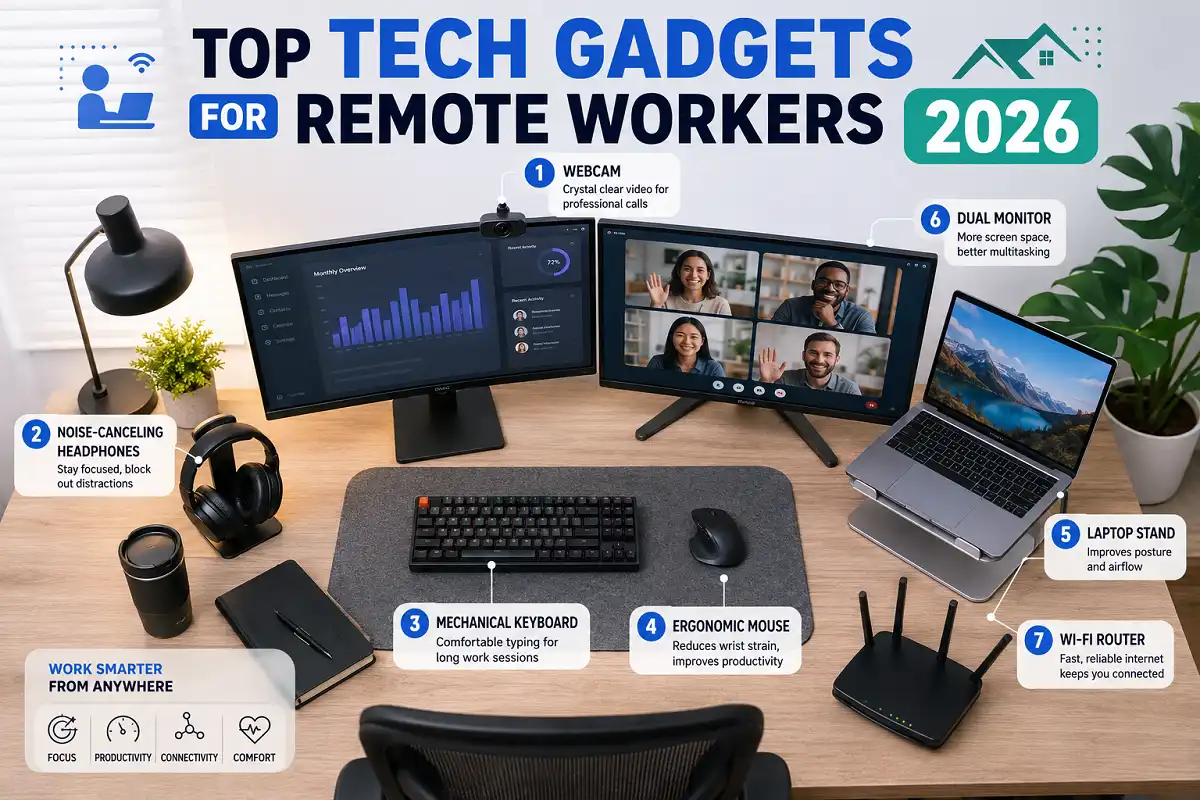
The best tech gadgets for remote workers in 2026 are a second monitor, a quality webcam, noise-canceling headphones, a mechanical keyboard, an ergonomic mouse, a laptop stand, and reliable Wi-Fi hardware. These tools improve comfort, video call quality, and daily focus more than anything else.
Why Tech Gadgets for Remote Workers Matter
Your tools shape how you work. A cramped screen, a weak mic, or a noisy room quietly steals hours each week. The right tech gadgets for remote workers turn those lost hours back into focus time.
Remote work is now standard for millions of people. Companies expect clear video calls and steady output. Good tech gadgets for remote workers help you meet that bar without stress.
These gadgets also protect your body. Poor posture and eye strain cause real pain over time. Smart choices here pay off for years.
How to Choose Tech Gadgets for Remote Workers
Start with your biggest daily pain point. If video calls look bad, fix your camera and light first. If your back hurts, prioritize ergonomics.
Match gear to your actual job. A designer needs color-accurate screens. A support agent needs a great headset. Buy for your real tasks, not hype.
Set a budget and stage your purchases. You do not need everything at once. Build your setup over a few months as needs become clear.
Check compatibility before you buy. Confirm ports, software, and operating system support. A quick check saves returns and frustration later.
The Best Tech Gadgets for Remote Workers
Below are the categories that deliver the most value. These tech gadgets for remote workers each solve a common home office problem. Pick the ones that fit your space and role.
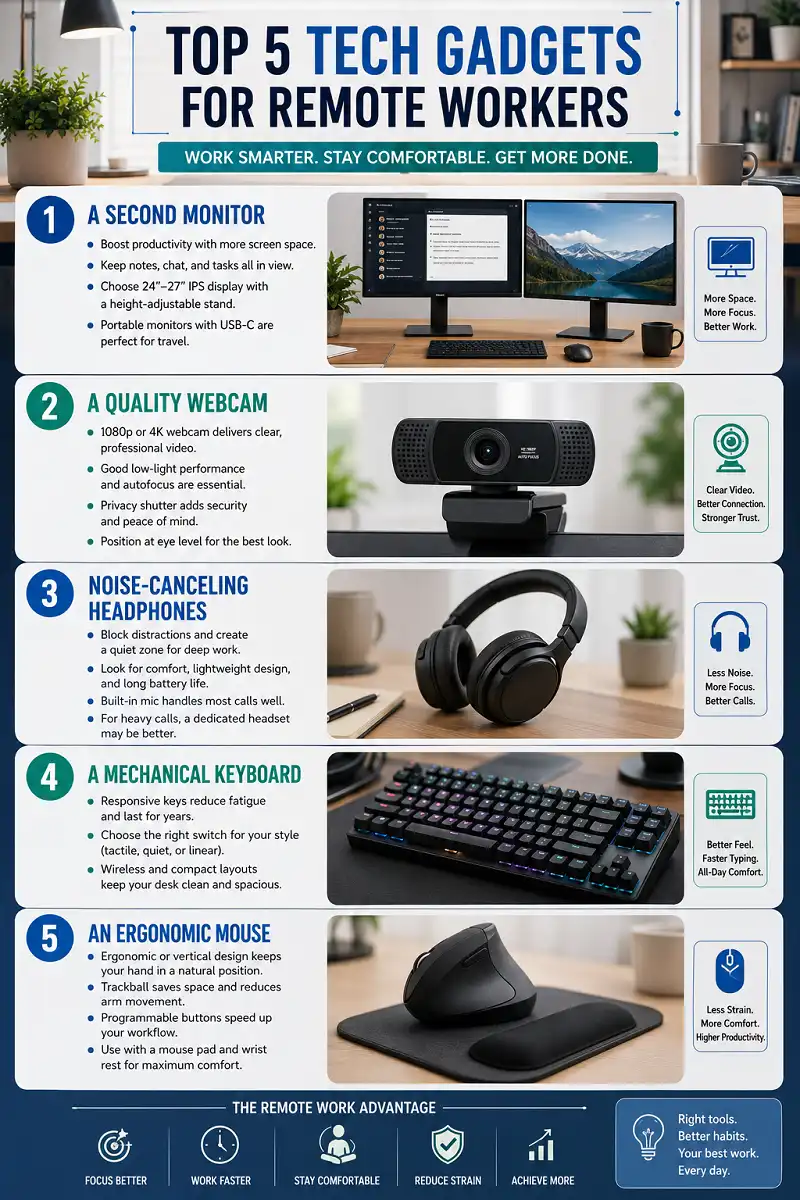
1. A Second Monitor
A second screen is the single biggest productivity upgrade for most people. Of all the options here, this one changes daily work the most. You stop switching tabs constantly and keep your notes, chat, and main task all in view.
Look for a 24 to 27 inch panel with an IPS display. That size fits most desks and offers sharp, steady color. A height-adjustable stand helps your posture too.
Portable monitors also exist for people who travel. They connect over a single USB-C cable. They turn any hotel desk into a real workspace.
2. A Quality Webcam
Laptop cameras still look grainy in low light. A dedicated 1080p or 4K webcam is a smart pick for anyone who joins calls daily. Clear video makes you look sharp and builds trust with your team.
Pick one with good low-light handling and autofocus. Many models include a privacy shutter. That small feature gives real peace of mind.
Position the camera at eye level for a natural look. A simple clip mount or small tripod does the job. Good framing matters as much as resolution.
3. Noise-Canceling Headphones
Home noise breaks concentration fast. Among tech gadgets for remote workers, active noise-canceling headphones do the most for focus. They create a quiet bubble for deep work and sharpen your voice on calls.
Comfort is key since you wear them for hours. Look for soft ear cushions and light weight. Long battery life keeps you going all day.
A built-in mic with clear pickup handles most meetings well. For heavy call schedules, a dedicated headset may serve you better. Choose based on how often you talk.
4. A Mechanical Keyboard
Typing is your main job for many roles. A good mechanical keyboard feels responsive and lasts for years. It reduces finger fatigue during long sessions.
Choose a switch type that matches your taste. Tactile switches suit typists who want feedback. Quiet switches work better in shared spaces.
Wireless models keep your desk tidy. Compact layouts free up room for your mouse. Pick a size that fits your hands and habits.
5. An Ergonomic Mouse
A standard mouse strains your wrist over time. An ergonomic or vertical mouse keeps your hand in a natural angle. This small change prevents real pain.
Trackball mice suit tight desks since they stay in place. Programmable buttons speed up common tasks. Test a few shapes to find your fit.
Pair your mouse with a supportive pad. A wrist rest adds comfort during long days. Together they protect one of your most-used joints.
6. A Laptop Stand
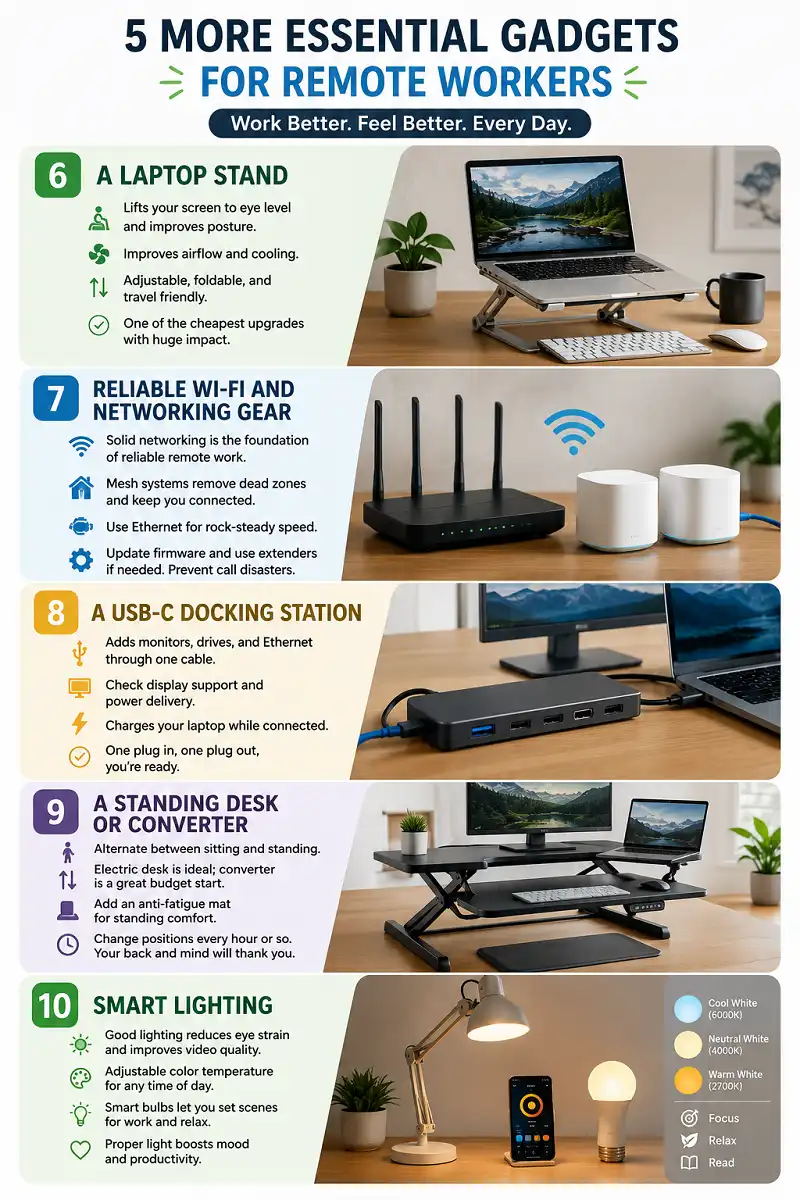
A laptop on a desk forces you to hunch down. A stand lifts the screen to eye level and fixes your posture. It also improves airflow and cooling.
Adjustable stands let you switch heights through the day. Foldable models travel easily in a bag. A stand plus an external keyboard is a proven combo.
This is one of the cheapest ergonomic upgrades you can make. The payoff for your neck and back is large. I recommend it as an early purchase.
7. Reliable Wi-Fi and Networking Gear
Nothing derails a call like a dropped connection. Solid networking is the foundation that makes all your tech gadgets for remote workers actually reliable. A modern router or mesh system keeps your whole home covered, so stable internet becomes the backbone of your day.
A mesh setup removes dead zones in larger homes. A wired Ethernet link gives your main device rock-steady speed. Even a simple adapter can help here.
If your signal is weak, a range extender fills the gaps. Keep your firmware updated for security and speed. Good networking prevents most call disasters.
8. A USB-C Docking Station
Modern laptops have very few ports. A docking station adds monitors, drives, and Ethernet through one cable. It turns your laptop into a full desktop in seconds.
Look for a dock with enough display and power output. Check that it charges your laptop while connected. One plug in, one plug out, and you are set.
This gadget shines for hybrid workers. You dock at home and grab your laptop for the office. The clean transition saves time every day.
9. A Standing Desk or Converter
Sitting all day is hard on your body. A standing desk lets you alternate between sitting and standing. Movement keeps your energy and focus steady.
A full electric desk is ideal but costs more. A desktop converter is a cheaper way to start. Both help you break up long static hours.
Add an anti-fatigue mat for standing comfort. Change positions every hour or so. Your back and mind will both thank you.
10. Smart Lighting
Bad lighting causes eye strain and dull video. A good desk lamp or key light brightens your space and your calls. Proper light also lifts your mood.
Choose adjustable color temperature for day and night. A soft front light removes harsh shadows on video. Your camera performance improves right away.
Smart bulbs let you set scenes for work and rest. Warm tones in the evening ease your eyes. Light is an underrated productivity tool.
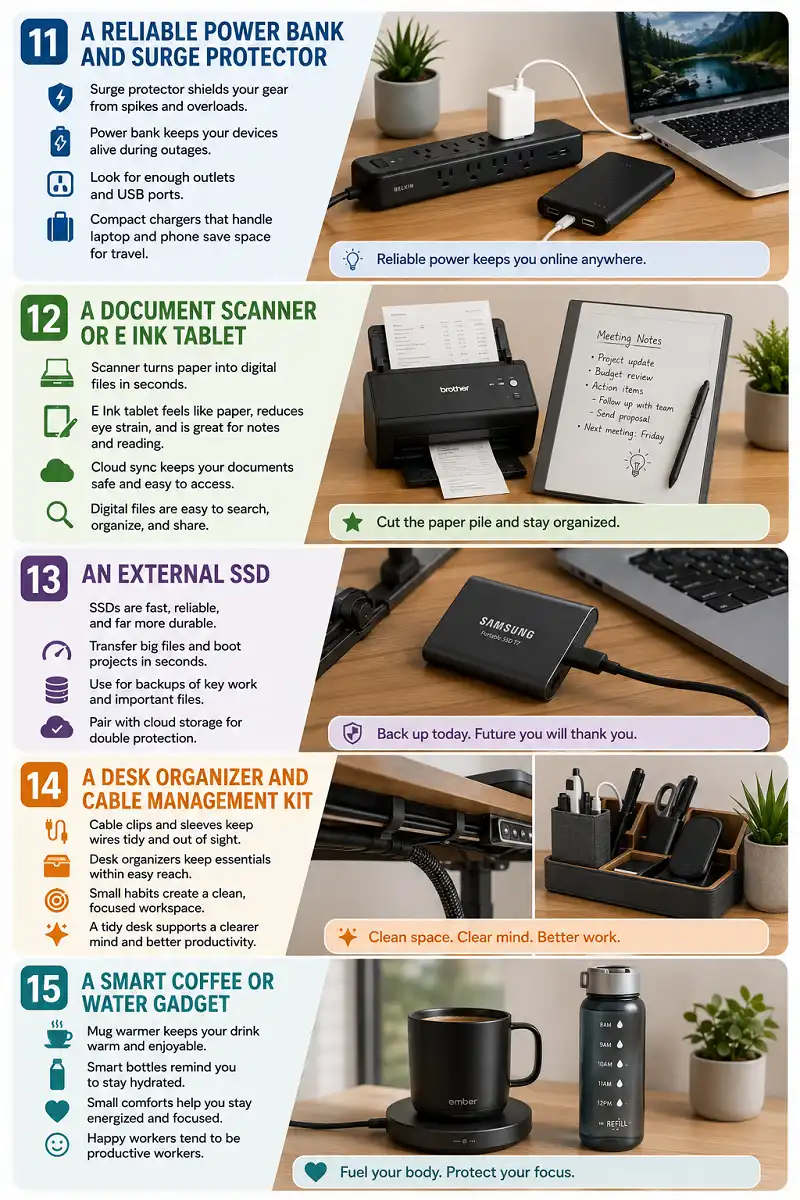
11. A Reliable Power Bank and Surge Protector
Power problems can wipe out your work. A surge protector shields your gear from spikes. A power bank keeps devices alive during outages.
Pick a surge protector with enough outlets and USB ports. A high-capacity power bank charges a laptop in a pinch. Both add a safety layer to your setup.
For frequent travelers, a compact charger matters. One that handles laptop and phone saves bag space. Reliable power keeps you online anywhere.
12. A Document Scanner or E Ink Tablet
Paper clutter slows down a paperless workflow. A portable scanner or an E Ink tablet keeps your notes and files organized. Digital documents are easy to search and share.
An E Ink tablet is one of the more underrated picks in this whole list. It feels like paper, spares your eyes from glare, and handles handwritten notes and reading well. Many people use one for meetings and planning. If you take a lot of notes by hand, our guide to the best e-ink writing tablet choices for work and study is worth a look.
A quick scanner turns receipts and contracts into clean files. Cloud sync keeps everything backed up. Together they cut the paper pile fast.
13. An External SSD
Running low on storage stalls your work. An external SSD gives you fast, portable space for big files. Backups protect you from data loss.
SSDs are far quicker than old hard drives. They boot projects and transfer files in seconds. A pocket-sized drive fits any bag.
Use one for regular backups of key work. Pair it with cloud storage for double safety. Losing files is a risk you can easily avoid.
14. A Desk Organizer and Cable Management Kit
A messy desk scatters your attention. Simple organizers and cable clips keep your space clean. A tidy desk supports a clearer mind.
Route cables under the desk with clips and sleeves. Group chargers in one spot for easy reach. Small habits keep the chaos away.
For a full walkthrough, see these practical ideas on tidy desk and cable setups. A clean workspace is a quiet productivity boost.
15. A Smart Coffee or Water Gadget
Small comforts keep you at your best. A smart mug warmer or reminder bottle keeps you fueled and hydrated. Steady habits protect your focus.
A mug warmer holds your drink at the right temperature. A smart bottle nudges you to drink water. These tiny tools support long work sessions.
Comfort gadgets are optional but pleasant. They make your desk a place you enjoy. Happy workers tend to be productive workers.
Common Mistakes When Buying Tech Gadgets for Remote Workers
Do not buy everything at once. You will waste money on tools you never use. Add gear as real needs appear.
Do not ignore ergonomics for looks. A pretty desk that hurts your back is a bad trade. Comfort should come first every time.
Do not skip the boring basics. Wi-Fi, lighting, and a good chair matter more than gadgets. Fix the foundation before you chase extras.
Do not forget compatibility. Check ports and software before buying. A mismatched device is just clutter.
Buying Tech Gadgets for Remote Workers on a Budget
You can build a strong setup step by step. Start with the items that fix your worst problem. Spread the cost over several months.
Refurbished and open-box deals cut prices sharply. Many tech gadgets for remote workers sell for far less this way, yet work like new. Buy from trusted sellers with a warranty.
Prioritize tools you use for hours daily. A keyboard, screen, and chair earn their cost fast. Save the fun extras for later.
If you want more focus-first picks, this roundup of gadgets that help concentration pairs well with a budget plan. Smart spending beats big spending.
Matching Tech Gadgets for Remote Workers to Your Role
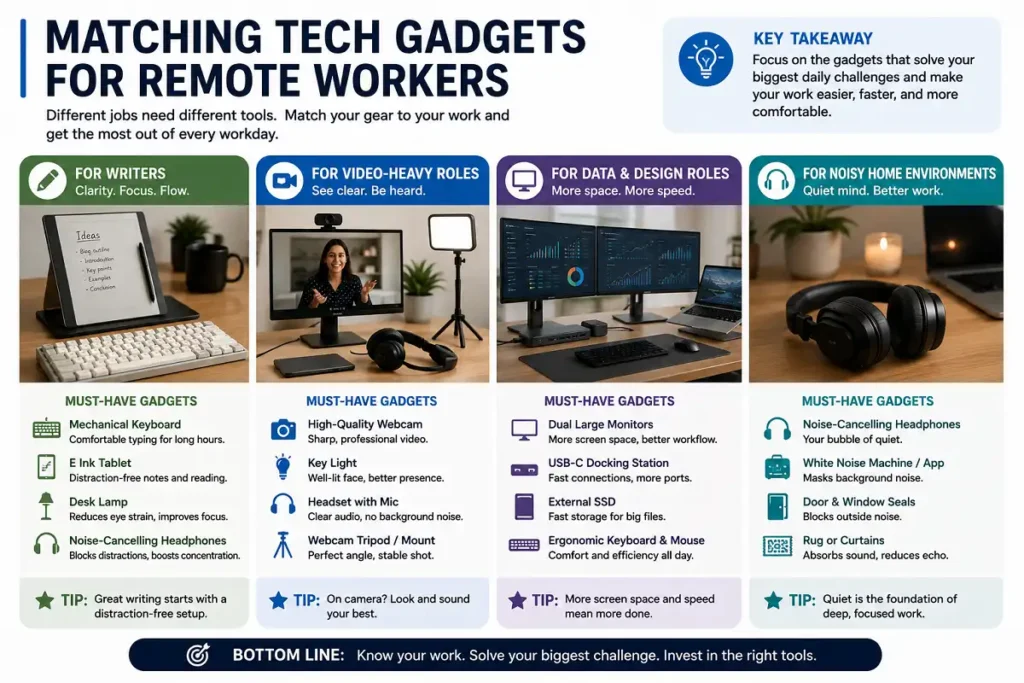
Different jobs need different tools. The best tech gadgets for remote workers depend on the work you do each day. A writer thrives with a great keyboard and an E Ink tablet. Clear typing and easy notes drive their day.
A video-heavy role needs a strong webcam, key light, and headset. Presence on camera is part of the job. Invest there first.
A data or design role benefits from dual large monitors and a dock. Screen space and fast connections speed the work. Match the gear to the task.
Anyone in a noisy home needs good headphones. Quiet is the base for any focused work. Start there if noise is your issue.
Health and Comfort Come First
Your body is your most important tool. The best tech gadgets for remote workers put ergonomics first and prevent pain that can last for years. Treat comfort as a real investment.
Take regular breaks to rest your eyes and stretch. The screen and gadgets support you, not the reverse. Movement keeps you sharp.
Set up your desk at the correct height. Feet flat, screen at eye level, wrists neutral. These basics prevent most home office aches.
Key Takeaways
The best tech gadgets for remote workers solve real daily problems. Focus, comfort, and clear communication should guide every purchase. Buy for your role, not for trends.
Start with a second monitor, good audio, and solid ergonomics. Add networking, storage, and lighting as your needs grow. The right tech gadgets for remote workers reward slow, quality-first buying over rushed spending.
Health comes first, so never trade comfort for looks. A smart, staged setup keeps you productive for the long run. The right tools make remote work feel easy again.
Further Reading
For more background on home office tools and remote work practices, the remote work page on Wikipedia offers a helpful overview of trends, benefits, and challenges.