
Introduction
In today’s digital world, the USB cable has become an essential tool for connecting devices, transferring data, and charging electronics. Whether you’re using a smartphone, laptop, tablet, or gaming console, USB wires play a critical role in keeping your devices powered and connected.
Despite their common use, many people don’t fully understand the different types of USB wires, their capabilities, and how to choose the right one. With rapid technological advancements, USB standards have evolved significantly, offering faster speeds, higher power delivery, and improved compatibility.
This comprehensive guide will walk you through everything you need to know about USB wires, including types, features, uses, and expert tips for selecting the best one.
What is a USB Cable?
A USB cable (Universal Serial Bus cable) is a standardized cable used to connect devices for communication and power supply. It allows data transfer between devices and can also deliver power for charging.
USB wires are widely used because of their versatility and universal compatibility across various devices such as:
- Smartphones
- Tablets
- Laptops
- Printers
- Cameras
- External hard drives
- Gaming devices
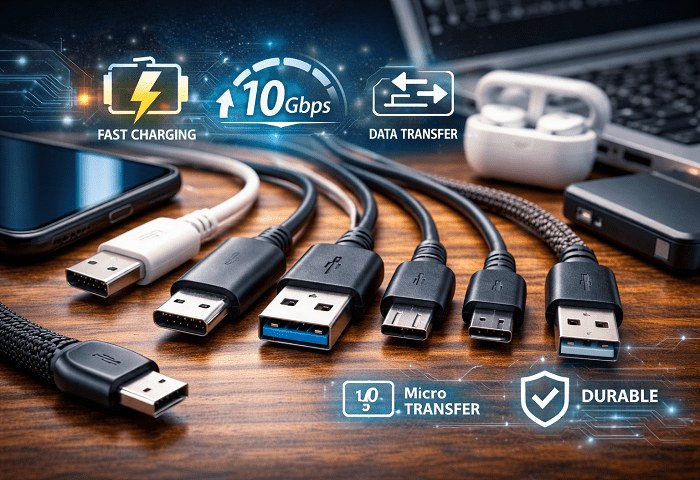
Types of USB Cables
Understanding the different types of USB wire is crucial for choosing the right one. Each type has unique features and compatibility.
1. USB Type-A
USB Type-A is the most common and recognizable connector. It is typically found on computers, chargers, and power adapters.
Key Features:
- Rectangular shape
- One-way insertion
- Compatible with most devices
2. USB Type-B
USB Type-B cables are mostly used for larger devices such as printers and external hard drives.
Key Features:
- Square shape
- Common in older devices
- Stable connection
3. Mini USB
Mini USB was widely used in older cameras and MP3 players but is now largely obsolete.
Key Features:
- Smaller than Type-B
- Limited modern use
4. Micro USB
Micro USB became the standard for many smartphones before USB-C.
Key Features:
- Compact design
- Widely used in older Android devices
- Affordable
5. USB Type-C
USB Type-C is the latest and most advanced USB wire type.
Key Features:
- Reversible connector
- Fast charging support
- High-speed data transfer
- Universal compatibility
USB Type-C is now widely adopted across smartphones, laptops, and other modern devices.
USB Cable Versions and Speeds
Not all USB wires are the same in terms of performance. Different USB versions determine speed and power capabilities.
USB 2.0
- Speed: Up to 480 Mbps
- Common for basic devices
USB 3.0 / 3.1
- Speed: Up to 5 Gbps or 10 Gbps
- Faster data transfer
USB 3.2 and USB4
- Speed: Up to 20–40 Gbps
- High-performance usage
Choosing the right USB wire version ensures optimal performance.
USB Cable for Charging vs Data Transfer
Many users assume all USB wires perform the same, but there is a difference between charging cables and data cables.
Charging-Only USB Cable
- Designed mainly for power
- Limited or no data transfer
Data USB Cable
- Supports both charging and data transfer
- Ideal for syncing devices
Always check specifications before purchasing.
Fast Charging and Power Delivery
Modern USB wires support fast charging technologies such as:
- USB Power Delivery (PD)
- Quick Charge (QC)
These technologies allow faster charging for devices, especially when using USB Type-C cables.
Common Uses of USB Cables
USB wires are used in various everyday applications:
1. Charging Devices
USB wires are widely used to charge smartphones, tablets, and laptops.
2. Data Transfer
They enable file transfer between devices quickly and efficiently.
3. Connecting Peripherals
Used for connecting keyboards, mice, printers, and other accessories.
4. Audio and Video Transmission
Some advanced USB wires support audio and video output.
How to Choose the Best USB Cable
Choosing the right USB wire can significantly impact performance and durability.
1. Check Compatibility
Ensure the cable matches your device port (USB-C, Micro USB, etc.).
2. Consider Cable Length
Short cables are ideal for travel, while longer cables provide flexibility.
3. Look for Fast Charging Support
Choose cables that support fast charging technologies.
4. Durability Matters
Look for braided or reinforced cables for long-term use.
5. Verify Data Speed
Choose a cable with appropriate speed for your needs.
USB Cable Safety Tips
Using low-quality USB wires can damage devices. Follow these safety tips:
- Avoid cheap, uncertified cables
- Check for overheating
- Use original or certified brands
- Replace damaged cables immediately
Common Problems with USB Cables
1. Slow Charging
Often caused by low-quality cables or incompatible chargers.
2. Connection Issues
Loose or damaged connectors can interrupt connectivity.
3. Cable Wear and Tear
Frequent bending can damage internal wires.
Future of USB Cables
The future of USB wires is centered around:
- Faster speeds (USB4 and beyond)
- Universal compatibility
- Improved durability
- Wireless alternatives
USB Type-C is expected to dominate the market as a universal standard.
Conclusion
The USB wire may seem like a simple accessory, but it plays a vital role in modern technology. From charging devices to transferring data, choosing the right USB wire can greatly enhance your experience.
Understanding the different types, speeds, and features helps you make informed decisions and avoid common issues. Whether you need a fast charging cable or a high-speed data transfer cable, investing in a quality USB wire is always worth it.
As technology continues to evolve, USB wires will remain an essential part of our digital lives, offering improved performance and convenience.